
Is your washing machine not spinning or draining? Learn the most common causes and simple fixes, from clogged hoses to unbalanced loads.
There are few things more frustrating than opening your washing machine after a cycle and finding your clothes sitting in a puddle of water.
If your washing machine is not spinning, the problem may seem serious, but in many cases, the cause is surprisingly simple. A clogged drain hose, an unbalanced load, an incorrect cycle setting, or a blocked pump filter can all prevent a washer from completing the spin cycle.
The good news? You can check several of these problems yourself before calling a repair technician.
In this guide, we’ll walk through the most common reasons a washing machine is not spinning or draining, what you can safely check at home, and when it’s time to stop troubleshooting and get professional help.
Why Is My Washing Machine Not Spinning?
A washing machine may refuse to spin for several different reasons.
The most common ones include:
- The washer cannot drain the water.
- The load is unbalanced.
- The machine is overloaded.
- The wrong wash cycle or spin speed was selected.
- The drain hose is kinked or clogged.
- The pump filter is blocked.
- The washer door or lid isn’t properly closed.
- The washing machine isn’t level.
- A drain pump may be malfunctioning.
- A mechanical or electrical component may have failed.
One important thing to understand is that a washer often won’t spin if it can’t drain properly. The machine may intentionally stop the spin cycle when water remains inside the drum.
So, if your washing machine isn’t spinning, don’t immediately assume the motor is broken. Start with the simple checks below.
1. Check If There Is Still Water Inside the Washer
This should be your first check.
Open the washer and look inside the drum.
Is there a significant amount of water still sitting in the bottom?
If yes, the problem may actually be a drainage issue rather than a spinning issue.
Many washing machines need to remove most of the water before they can enter the high-speed spin portion of the cycle. If the water can’t leave the machine, the spin cycle may not start.
This is why the symptoms can appear together:
Washer won’t drain → washer won’t spin → clothes remain soaking wet.
If there’s standing water, focus on the drainage system first.
2. Check the Drain Hose
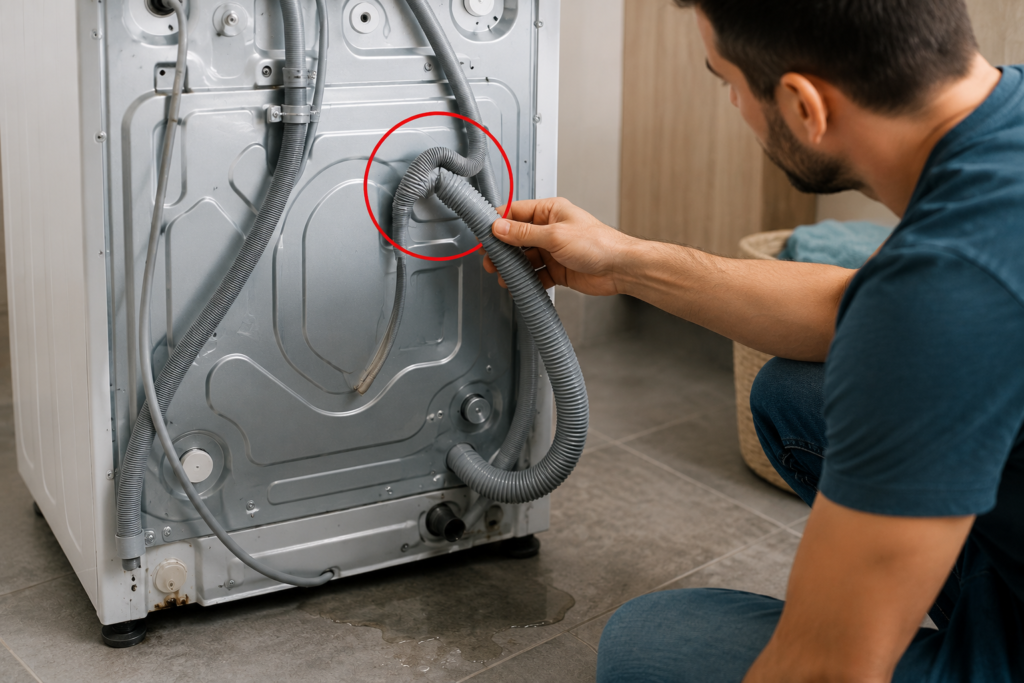
A kinked, crushed, or blocked drain hose is one of the easiest things to overlook.
Move the washer away from the wall carefully and inspect the hose at the back.
Look for:
- Sharp bends
- Kinks
- Crushed sections
- Objects blocking the hose
- A hose pressed tightly against the wall
- Incorrect installation
A restricted drain hose can prevent water from leaving the washer properly.
Manufacturers such as Whirlpool and LG specifically recommend checking the drain hose for kinks, clogs, compression, and incorrect positioning when a washer won’t drain.
What to do
- Unplug the washing machine.
- Carefully pull it away from the wall.
- Inspect the entire drain hose.
- Straighten any sharp bends.
- Make sure the hose isn’t being crushed by the machine.
- Check the end of the hose for visible blockage.
- Make sure the hose is installed according to your washer’s manual.
Don’t simply remove the hose and guess at its correct position. Drain hose height and installation requirements vary between models.
3. Check the Drain Pump Filter
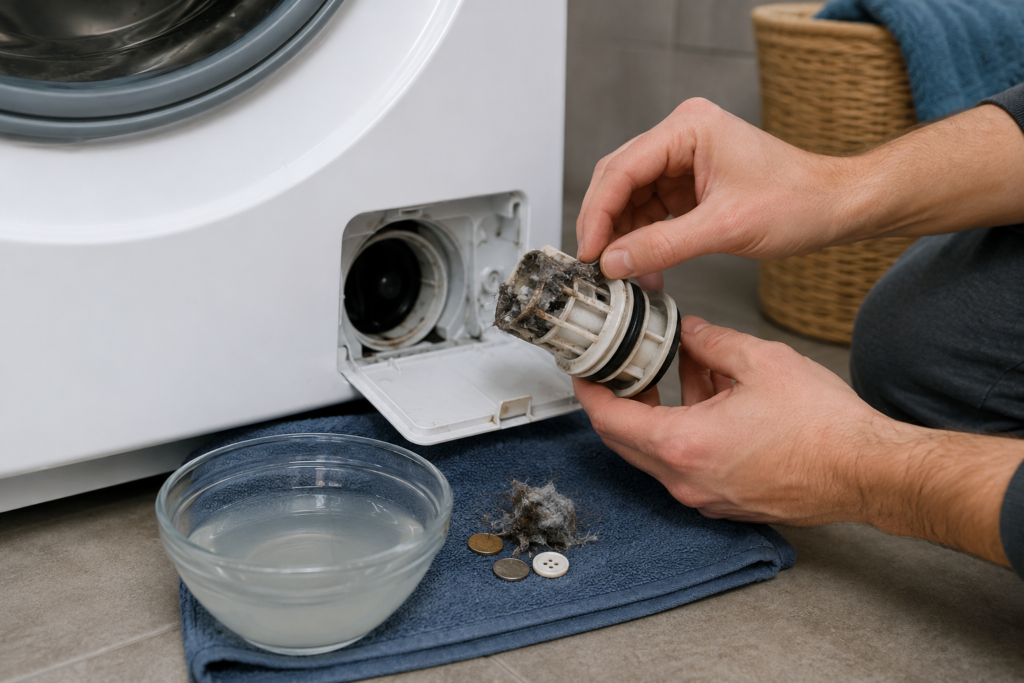
If your washing machine has a drain pump filter, it could be clogged with debris.
This is particularly common with front-loading washers.
The filter can collect things such as:
- Coins
- Lint
- Hair
- Small pieces of fabric
- Buttons
- Paper
- Hairpins
- Other small objects accidentally left in pockets
When the filter becomes blocked, water may drain slowly or not drain at all.
LG identifies a clogged pump filter as one of the common causes of a washer that won’t drain.
How to clean the pump filter
The exact procedure varies by model, so check your owner’s manual first.
Generally:
- Turn the washer off and unplug it.
- Locate the pump filter access panel, usually near the lower front of a front-load washer.
- Place a shallow container and towels underneath.
- Drain any remaining water carefully.
- Remove the pump filter.
- Clean away debris and buildup.
- Check inside the filter housing for additional objects.
- Reinstall the filter securely.
- Close the access panel.
- Run a short drain or spin test.
Be careful: water trapped inside the washer may be hot. Manufacturers warn that opening the pump filter can release a significant amount of water.
If your washer doesn’t have an accessible pump filter, don’t try to disassemble it just to find one. Check the owner’s manual instead.
4. Make Sure the Load Isn’t Unbalanced
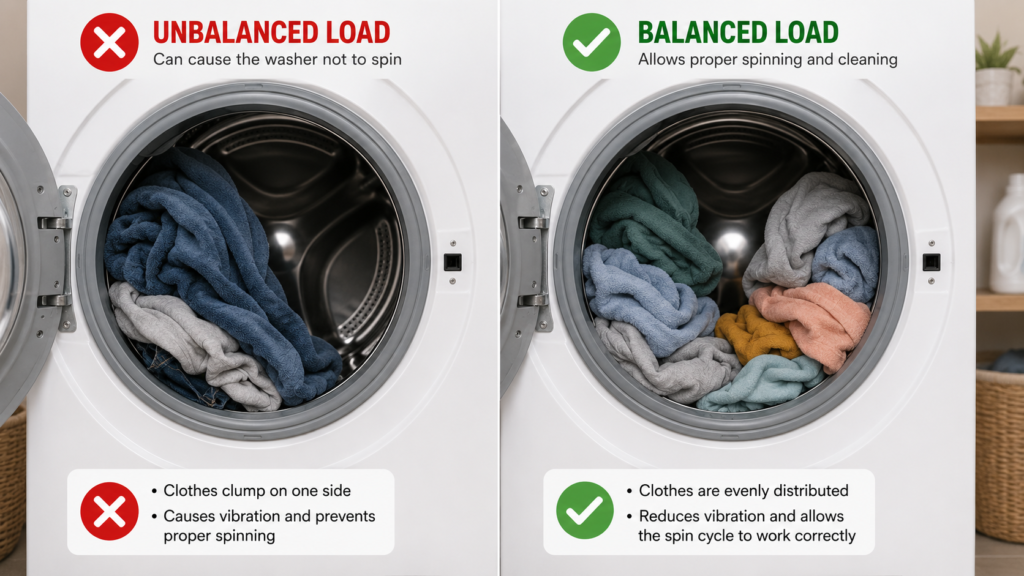
Sometimes the washing machine itself is perfectly fine.
The problem may simply be the clothes inside it.
A washing machine can stop or reduce the spin speed when the load becomes badly unbalanced.
This commonly happens when you’re washing:
- A single heavy towel
- A blanket
- A large comforter
- Heavy jeans
- Bath mats
- A small number of bulky items
The clothes can move to one side of the drum, creating an uneven load.
The washer may then repeatedly try to redistribute the load before giving up on the spin cycle.
Whirlpool specifically recommends checking for single bulky items, overloaded loads, and uneven distribution when a washer isn’t spinning properly.
Try this
Pause the washer and redistribute the clothes evenly around the drum.
If you’re washing one large item, add a few similar-sized items if your washer’s instructions allow it.
Then select a Drain & Spin or Spin Only cycle.
If the washer spins normally afterward, the problem was probably an unbalanced load.
5. Check If the Washer Is Overloaded
Overloading your washing machine can also prevent a proper spin cycle.
When the drum is packed too tightly, clothes may not move freely enough for the washer to balance the load.
A load can look reasonable before adding water but become extremely heavy once saturated.
If your clothes come out unusually wet and the washer struggled during the spin cycle, try running a smaller load.
A simple test
Remove some of the clothes and run a spin cycle again.
If the washer spins normally with the smaller load, avoid filling the drum as tightly in future cycles.
Remember that the correct load size depends on your specific machine. Your owner’s manual is the best reference for maximum capacity.
6. Check the Spin Speed and Wash Cycle
Before assuming something is broken, check the settings.
Some cycles intentionally use a low spin speed or no spin at all.
For example, delicate or hand-wash settings may use reduced spin speeds to protect fabrics.
If the machine has a No Spin, Low Spin, or similar setting selected, your clothes may remain wetter than expected even though the washer is working normally.
Whirlpool recommends checking the selected cycle and spin speed when clothes remain wet after a cycle.
Try this
Select:
Drain & Spin
or
Spin Only
Then choose an appropriate spin speed for the load.
If the washer completes the cycle normally, there may not be a mechanical problem at all.
7. Make Sure the Washer Door or Lid Is Fully Closed
Modern washing machines have safety systems designed to prevent the drum from spinning when the door or lid isn’t properly closed or locked.
For a front-load washer, close the door firmly and make sure it latches.
For a top-load washer, make sure the lid is completely closed.
If the washer thinks the door or lid isn’t secure, it may refuse to start the spin cycle.
Whirlpool notes that the door must be completely closed and latched for the washer to operate, and drainage problems can also keep some front-load washer doors locked.
Also check for:
- Clothing caught between the door and gasket
- Debris around the latch
- A door that doesn’t close properly
- An error code on the display
- A lid that feels loose or doesn’t engage correctly
If the door or lid appears mechanically damaged, don’t bypass the safety switch.
8. Check Whether the Washing Machine Is Level
A washer that isn’t sitting level can vibrate excessively during the spin cycle.
Excessive vibration can cause the machine to interrupt or reduce the spin cycle.
Place the washer on a firm, level surface and check whether it rocks when you gently push the corners.
If it rocks, the leveling feet may need adjustment.
Also look at the surrounding floor. A damaged or unstable floor can contribute to excessive movement.
A level washer is especially important for high-speed spin cycles.
9. Check the Drainpipe or Household Drain
Sometimes the washing machine isn’t the problem.
The household drain connected to the washer may be clogged.
Here’s a useful clue:
If water flows properly from the washer’s drain hose but backs up when it enters the household drain, the problem may be in the drainpipe rather than inside the washing machine.
LG recommends testing the washer’s drainage path to help distinguish between a washer problem and a clogged household drain.
If the drainpipe is clogged, you may need to clear the plumbing rather than repair the washer.
10. Listen to What the Washing Machine Is Doing
The sounds your washer makes can provide useful clues.
You hear a humming sound but no water leaves
The drain pump may be trying to operate while dealing with an obstruction.
Check the drain hose and pump filter first.
You hear repeated clicking
The machine may be attempting to lock the door, redistribute the load, or complete another part of the cycle.
Check for error codes and make sure the door or lid is properly closed.
The washer is completely silent
Check:
- Power connection
- Circuit breaker
- Control panel
- Door or lid lock
- Error messages
The washer drains but never spins
If the washer successfully removes the water but the drum still won’t spin, the problem may be related to the drive system, motor, belt, control system, or another component.
At this point, professional diagnosis may be the safest option.
Washing Machine Not Draining or Spinning? Try This Quick Checklist
If you need a fast troubleshooting routine, go through these steps in order:
Step 1: Look for standing water
If there’s water in the drum, troubleshoot the drain first.
Step 2: Check the drain hose
Look for kinks, crushing, or visible blockages.
Step 3: Clean the pump filter
If your model has one, remove debris carefully.
Step 4: Redistribute the clothes
Make sure the load isn’t heavily concentrated on one side.
Step 5: Reduce the load
Remove some items if the washer is packed tightly.
Step 6: Check the cycle settings
Make sure No Spin or Low Spin wasn’t selected.
Step 7: Check the door or lid
Make sure it closes and locks correctly.
Step 8: Check the washer’s level
Make sure the machine doesn’t rock or wobble.
Step 9: Run Drain & Spin
After making the necessary adjustments, test the washer.
Step 10: Look for error codes
Write down any code displayed on the control panel and check your owner’s manual.
Why Does My Washing Machine Fill With Water but Not Spin?
If your washer fills normally but doesn’t spin, several possibilities exist.
First, check whether the washer is actually draining.
If water remains in the drum, the washer may be preventing the spin cycle because the drainage problem hasn’t been resolved.
If the water drains completely but the drum doesn’t rotate, check:
- Door or lid lock
- Cycle settings
- Load balance
- Washer level
- Error codes
If those checks don’t reveal the problem, the issue could involve a mechanical or electrical component.
Don’t assume that a failed motor is the cause without testing the simpler possibilities first.
Why Is My Washing Machine Not Spinning but Draining?
This situation is slightly different.
If the washer drains normally but the drum doesn’t spin, start with the easiest possibilities.
Check the selected cycle and spin speed first.
Then remove or redistribute the laundry and try another spin cycle.
If the washer still drains but never spins, there may be a problem with a component responsible for driving or controlling the drum.
Depending on the washer design, this could involve parts such as the motor, belt, clutch, actuator, control board, or door/lid sensing system.
Because these components vary significantly between brands and models, the correct diagnosis usually requires the model-specific service information.
Why Is My Washing Machine Not Draining but Spinning?
A washer that appears to spin but doesn’t drain properly has a different set of likely causes.
Check the:
- Drain hose
- Pump filter
- Household drain
- Drain pump
- Hose installation
A partial blockage can allow some water to leave while preventing the machine from draining efficiently.
If the washer is taking much longer than usual to drain, don’t ignore the problem. A partially blocked drainage system can eventually become completely blocked.
What If the Washer Is Full of Water and Won’t Spin?
Don’t repeatedly run the washer if the drum is full of water.
First, unplug the machine and check your owner’s manual for the correct emergency draining procedure.
If your model has an accessible pump filter or emergency drain hose, follow the manufacturer’s instructions.
Be prepared for water to come out when opening the drainage system.
If you’re unsure how to safely remove the water, or the washer contains a large amount of water, contacting a qualified appliance technician may be the better choice.
When Should You Stop Troubleshooting?
Some washing machine problems are simple enough to handle yourself.
Others are better left to a professional.
Call a qualified appliance repair technician if:
- The washer still won’t spin after basic troubleshooting.
- The drain pump appears to have failed.
- You hear grinding, burning, or unusual mechanical noises.
- The washer is leaking from an internal component.
- The door or lid lock is damaged.
- The motor doesn’t operate.
- The machine repeatedly displays an error code.
- You notice burning smells.
- Electrical components appear damaged.
- The problem keeps coming back after temporary fixes.
Never remove electrical panels or work on internal electrical components while the appliance is connected to power.
How to Prevent Your Washing Machine From Not Spinning Again
A little maintenance can prevent many common washer problems.
Don’t overload the drum
Follow your manufacturer’s recommended capacity.
Check pockets before washing
Coins, keys, hairpins, and other small objects can end up in the drainage system.
Clean the pump filter when applicable
If your washer has an accessible pump filter, follow the manufacturer’s recommended cleaning schedule.
Keep the drain hose properly positioned
Make sure it isn’t crushed, kinked, or incorrectly installed.
Use the correct amount of detergent
Too much detergent can contribute to residue buildup and excessive suds.
Keep the washer level
A stable washer is less likely to experience excessive vibration during high-speed spinning.
Don’t ignore slow draining
A washer that drains slowly may be giving you an early warning of a developing blockage.
Frequently Asked Questions
Why is my washing machine not spinning?
The most common causes include an unbalanced or overloaded load, incorrect spin settings, a drainage problem, a blocked drain hose or pump filter, a door or lid issue, or a mechanical fault.
Start by checking whether there is water left inside the drum.
Why is my washing machine not draining?
A washer may not drain because of a clogged pump filter, kinked or blocked drain hose, blocked household drain, incorrect hose installation, or a faulty drain pump.
Can a washing machine not drain because of a clogged filter?
Yes. A clogged pump filter can restrict water flow and prevent the washer from draining properly. Always follow the instructions for your specific model when cleaning the filter.
Why won’t my washer spin after washing?
If water remains in the drum, troubleshoot the drainage system first. If the drum is empty, check the load balance, cycle settings, door or lid, and error codes.
Should I run another cycle if my washer won’t spin?
It’s better to identify the cause first. If the washer contains standing water, repeatedly running cycles may not solve the problem. Check the drainage system and owner’s manual before trying another cycle.
Why are my clothes still soaking wet after washing?
Your washer may not have completed the spin cycle, the selected cycle may use a low spin speed, the load may be unbalanced, or the washer may have a drainage problem.
Can an unbalanced load stop a washing machine from spinning?
Yes. A heavily unbalanced load can cause the washer to reduce or interrupt the spin cycle. Redistributing the clothes and running another spin cycle may solve the problem.
How do I know if my washing machine drain pump is bad?
A failed or malfunctioning drain pump can cause poor or failed drainage. If the drain hose and filter are clear but the washer still cannot drain, the pump may need further diagnosis or replacement.
Is it worth repairing a washing machine that won’t spin?
It depends on the age, condition, repair cost, and value of the appliance. A simple hose blockage or filter cleaning can be inexpensive, while major component failures may require a more careful repair-versus-replacement decision.
Final Thoughts
When your washing machine is not spinning, it’s easy to assume the worst.
But don’t rush to replace the washer or call for an expensive repair.
Start with the basics: check for standing water, inspect the drain hose, clean the pump filter if your model has one, redistribute the load, check the spin settings, and make sure the door or lid is properly closed.
In many cases, the solution is something simple that you can identify in just a few minutes.
If the washer still won’t drain or spin after these checks, however, the problem may involve an internal component that requires professional attention.
The most important thing is to troubleshoot safely and avoid taking apart electrical or mechanical components unless you’re qualified to do so.
A little careful troubleshooting can often turn a frustrating laundry-day problem into a surprisingly easy fix.
Quick Reference: Washing Machine Not Spinning
Washer won’t spin + water remains inside:
Check the drain hose, pump filter, household drain, and drain pump.
Washer won’t spin + drum is empty:
Check load balance, spin settings, door/lid lock, and error codes.
Washer spins slowly:
Check the selected spin speed, load size, and load balance.
Washer makes unusual noises:
Stop the cycle and investigate before continuing.
Washer still won’t spin after basic checks:
Consider professional diagnosis.
Sources & Further Reading
- Whirlpool — Washer Not Draining or Spinning Troubleshooting Guide
- Whirlpool — Front Load Washer Not Spinning Troubleshooting
- LG — Why Is My Washing Machine Not Draining?
- LG — Washing Machine Water Not Draining Troubleshooting
Primary SEO Keyword: Washing Machine Not Spinning
Secondary Keywords: washing machine not draining, washing machine not spinning or draining, washer not spinning, washer won’t spin, washer won’t drain, washing machine won’t spin, washing machine not draining, washing machine spin cycle not working, washer full of water, washing machine troubleshooting, washing machine drain problem